How to Choose Between Aside, Perplexity Comet, and ChatGPT Atlas for Your Daily Workflow

Problem
I need an AI browser that can handle my daily workflows — logging into multiple sites, downloading bank statements, renaming files, uploading them to Drive. But when I tested the three main options — Aside, Perplexity Comet, and ChatGPT Atlas — I realized they solve completely different problems. Picking the wrong one means either paying for features I don’t need or missing automation that would save me hours every week.
What Each Browser Actually Does
Before comparing features, you need to understand what these three tools are trying to be:
Aside is a full Chromium-based browser replacement. You import your history, cookies, and bookmarks from Chrome or Arc, then let AI agents perform tasks across your tabs, accounts, and local files. It runs long-running autonomous tasks with granular permission controls.
Perplexity Comet is a research engine. It navigates multiple websites simultaneously, gathers information, and synthesizes it into answers. Think of it as Perplexity’s search capability extended into an autonomous assistant that does the clicking and reading for you.
ChatGPT Atlas is a macOS browser with OpenAI’s conversational AI built in. It has page summarization and an “Agent Mode” that can interact with websites on your behalf, but it stays within the OpenAI ecosystem.

Feature-by-Feature Comparison
Here’s what matters when you actually use these daily:
| Capability | Aside | Perplexity Comet | ChatGPT Atlas |
|---|---|---|---|
| What it replaces | Your entire browser | Research across tabs | macOS browser + ChatGPT |
| Multi-site workflows | Yes — spans sites, accounts, files | Yes — synthesizes across sites | Yes — Agent Mode |
| Password manager | Built-in, hidden from agents | Unknown | Unknown |
| Filesystem access | Read Only / Guard / Full Access | Not described | Not described |
| Import from existing browser | History, cookies, bookmarks | Not described | Not described |
| Side panel context | Attaches current page to tasks | Multi-site synthesis | Not described |
| AI provider choice | Built-in + subscriptions + BYOK | Perplexity only | OpenAI only |
| Developer tools | CLI, MCP, REPL | Not described | Not described |
| Scheduled tasks | Yes — recurring routines | Not described | Not described |
| Platform | macOS 15.0+ | Not specified | macOS only |
BYOK means “bring your own key” — you can plug in your Anthropic, OpenAI, Google, OpenRouter, or xAI API key.
The Three Lanes of AI Browsers
After using all three, I think the AI browser category has split into three distinct lanes:

Lane 1: Full Browser Replacement (Aside)
Aside wants to be the browser you open first thing in the morning. Its AI agents can log into your bank, download statements, rename them, and upload them to Google Drive — all while you work on something else.
The side panel is what makes Aside different: you can attach any open page as context to a running task. Tell the agent “use this invoice page to fill out the form on that other tab,” and it figures out the mapping.
The permission model stands out too. Each task gets its own filesystem access level:
- Read Only — the agent can see files but can’t change them
- Guard — the agent asks before writing anything
- Full Access — the agent can read and write freely
Tasks can also run in Default, Incognito, or Ultrabrowse modes depending on what you’re doing.
If you’re a developer, Aside gives you CLI access, MCP server support, and a REPL — you can script and extend it. It also supports recurring scheduled tasks, so you can have it check something every morning at 9 AM.
Lane 2: Research Copilot (Perplexity Comet)
Comet is not trying to be your main browser. It specializes in one thing: going to multiple websites, reading them, and synthesizing the information. If you need to compare product pages across five sites or gather documentation from different sources, Comet does that faster than opening five tabs and reading them yourself.
The trade-off is that Comet stays inside Perplexity’s AI ecosystem. You can’t swap in Claude or GPT-4o if you prefer a different model.
Lane 3: Ecosystem Browser (ChatGPT Atlas)
Atlas extends the ChatGPT experience into a macOS browser. If you already use ChatGPT heavily, Atlas gives you page summarization and Agent Mode without leaving the ecosystem.
But you’re locked into OpenAI’s models, and you don’t get the cross-app automation that Aside offers. Agent Mode can interact with websites, but it’s not designed for multi-step workflows that span different services and local files.
How to Decide
I made my choice based on what I actually do daily:
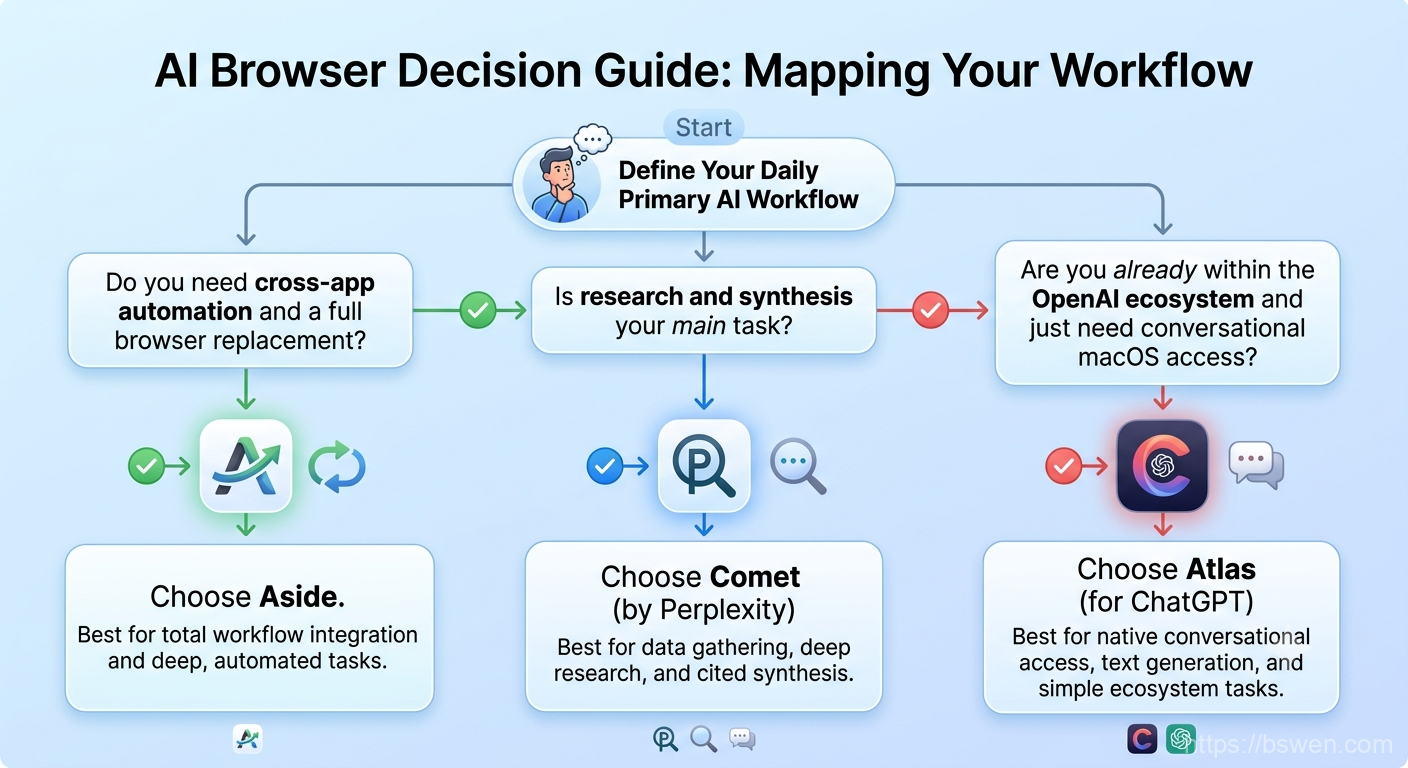
- Pick Aside if you want AI to handle multi-step workflows that span websites, accounts, and local files. If your day involves logging into SaaS tools, downloading reports, filling forms, and organizing files — Aside replaces the manual clicking.
- Pick Perplexity Comet if your primary need is researching across multiple websites and synthesizing information. It’s a research specialist, not a daily browser.
- Pick ChatGPT Atlas if you’re deep in the OpenAI ecosystem and want conversational AI layered on top of lightweight browsing. Agent Mode is useful, but it won’t replace your main browser yet.
If you’re like me and need a daily-driver browser with deep task automation, Aside is the clearest fit right now. But if your work is 80% research and 20% browsing, Comet might be the better tool. Atlas works best if you already live in ChatGPT and just want to extend that experience to your browser tabs.
Summary
In this post, I compared Aside, Perplexity Comet, and ChatGPT Atlas across the features that matter for daily AI-powered browsing. The key takeaway is that these three tools aren’t really competitors — they solve different problems. Aside replaces your browser with AI-native task execution, Comet excels at multi-site research synthesis, and Atlas brings ChatGPT’s conversational model to a macOS browser. Pick based on your actual workflow, not the feature list.
Final Words + More Resources
My intention with this article was to help others share my knowledge and experience. If you want to contact me, you can contact by email: Email me
Here are also the most important links from this article along with some further resources that will help you in this scope:
Oh, and if you found these resources useful, don’t forget to support me by starring the repo on GitHub!
Comments